> ## Documentation Index
> Fetch the complete documentation index at: https://docs.voiceos.com/llms.txt
> Use this file to discover all available pages before exploring further.
# Build with code
> Hand-build, verify, and install an integration in about ten minutes.
The developer path — everything the [no-code quickstart](/integrations/quickstart)
does, built by hand.
You'll build **Coffee Tracker**: say *"log a flat white"* and VoiceOS records it
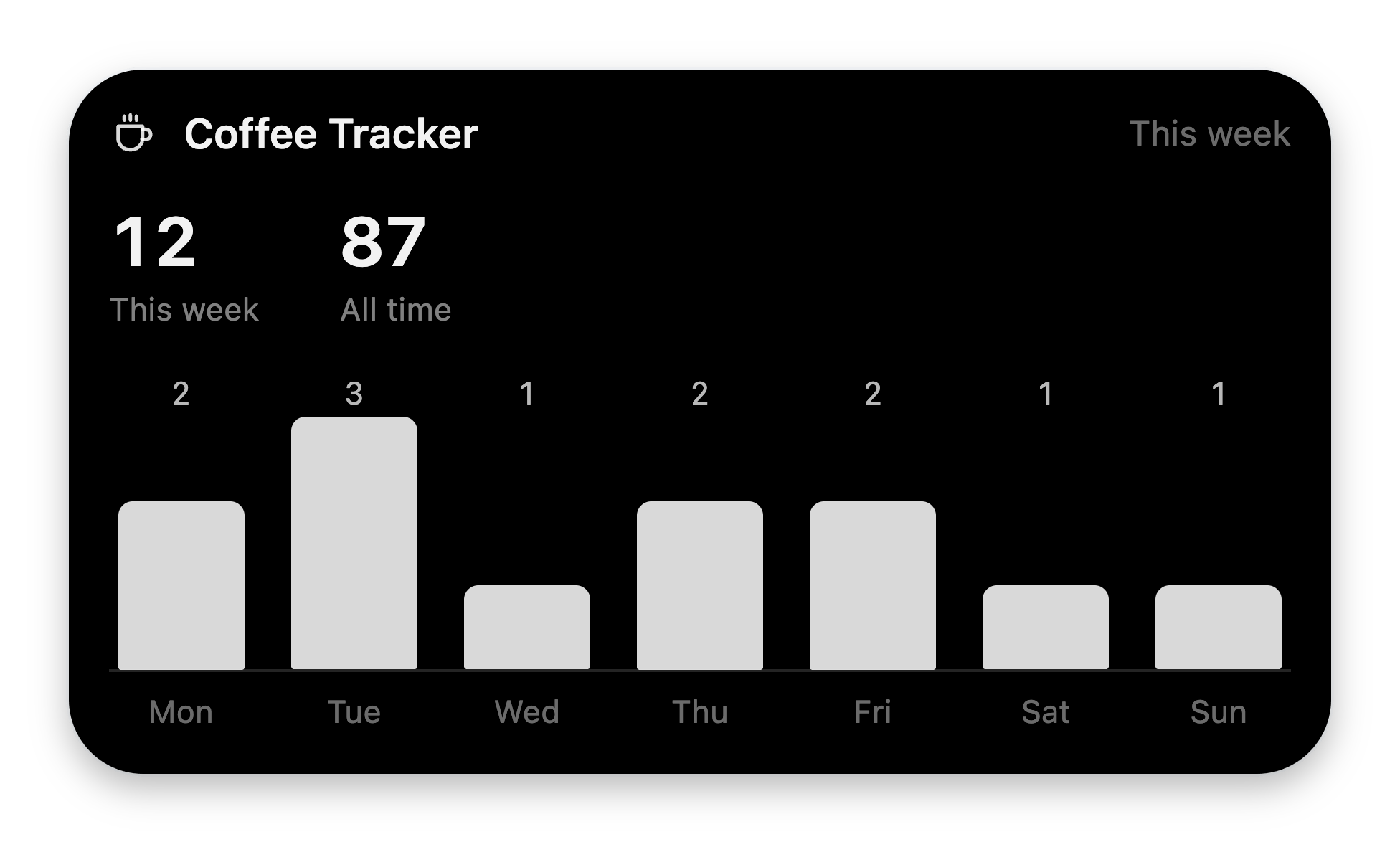
after a confirmation card; ask *"how's my coffee habit?"* and the notch shows a
stats card with a weekly chart. Two tools, native UI, no VoiceOS internals.
**Prerequisite:** [bun](https://bun.sh). That's all.
```bash theme={null}
bunx @voiceos/integration-sdk init "Coffee Tracker"
```
During the developer preview the SDK ships inside the VoiceOS repository. If
the package isn't available to you yet, run
`bun voiceos-integration-sdk/src/cli.ts init "Coffee Tracker"` from a checkout.
You get a complete, standalone folder:
```text theme={null}
coffee-tracker/
├── voiceos.integration.json # the manifest
├── server.ts # a working MCP server (stub logic)
├── verify.ts # smoke test
├── voiceos.integration.preview.json # sample inputs for verify + previews
├── AGENTS.md # the whole contract, for AI coding agents
├── README.md
└── package.json
```
Standalone means it imports nothing from the SDK — the one glance helper it
needs is inlined. It runs anywhere with bun, and an AI coding agent pointed at
the folder learns the entire contract from `AGENTS.md`.
Three templates: `confirm-and-send` (default — an acting tool with a
confirmation card), `fetch-and-show-list` (a read-only lookup), and
`background-task` (long-running work). Pick with `--template`.
Replace the `tools` array in `voiceos.integration.json` with two tools — one
that acts (and so declares a `confirmation`), one that only reads (and so must
not):
```json voiceos.integration.json theme={null}
{
"schemaVersion": 1,
"id": "com.you.coffee-tracker",
"version": "1.0.0",
"name": "Coffee Tracker",
"summary": "Log every coffee by voice and glance your habits in the notch.",
"publisher": { "id": "pub_you", "name": "You" },
"runtime": { "kind": "local-mcp", "command": "bun", "args": ["server.ts"] },
"tools": [
{
"name": "log_coffee",
"title": "Log coffee",
"description": "Log a coffee the user drank. Use when the user says they had, drank, or want to log a coffee.",
"inputSchema": {
"type": "object",
"properties": {
"drink": { "type": "string", "description": "What they drank, e.g. flat white" },
"shots": { "type": "number", "description": "Espresso shots (default 1)" }
},
"required": ["drink"]
},
"confirmation": {
"schemaVersion": 1,
"root": {
"type": "card",
"title": "Log coffee",
"children": [
{ "type": "textField", "bind": "{{drink}}", "label": "Drink" }
],
"footer": [
{
"type": "actions",
"items": [
{ "label": "Cancel", "role": "cancel" },
{ "label": "Log it", "role": "confirm", "color": "accent" }
]
}
]
}
}
},
{
"name": "coffee_stats",
"title": "Coffee stats",
"description": "Show how much coffee the user has been drinking. Use when the user asks about their coffee habits, count, or stats.",
"inputSchema": { "type": "object", "properties": {} }
}
]
}
```
Two things to notice:
* **Descriptions are routing rules.** The agent reads them to decide when to
call your tool — say *what it does* and *when to use it*.
* **The confirmation is data, not code.** It renders before your server runs.
`{{drink}}` binds the text field to the tool argument; whatever the user edits
it to is what your handler receives.
 Replace `server.ts`. It's a standard [MCP](https://modelcontextprotocol.io)
stdio server; the only VoiceOS-specific part is spreading `glanceResult([...])`
into the JSON result — that's your card in the notch.
```ts server.ts theme={null}
/** Coffee Tracker — a VoiceOS integration server (standard MCP over stdio). */
import { McpServer } from "@modelcontextprotocol/sdk/server/mcp.js";
import { StdioServerTransport } from "@modelcontextprotocol/sdk/server/stdio.js";
import { z } from "zod";
// VoiceOS glance helper — inlined; also exported by the integration SDK.
function glanceResult(blocks: Array & { type: string }>) {
if (blocks.length === 0 || blocks.length > 3) {
throw new Error("glanceResult: pass 1-3 blocks");
}
return { _voiceos_glance: { blocks } };
}
const jsonResult = (payload: unknown) => ({
content: [{ type: "text" as const, text: JSON.stringify(payload) }],
});
const LOG_FILE = new URL("./coffee-log.json", import.meta.url);
const DAYS = ["Mon", "Tue", "Wed", "Thu", "Fri", "Sat", "Sun"];
type Entry = { at: string; drink: string; shots: number };
async function readLog(): Promise {
try {
return JSON.parse(await Bun.file(LOG_FILE).text());
} catch {
return [];
}
}
const server = new McpServer({ name: "coffee-tracker", version: "1.0.0" });
server.registerTool(
"log_coffee",
{
title: "Log coffee",
description:
"Log a coffee the user drank. Use when the user says they had, drank, or want to log a coffee.",
inputSchema: {
drink: z.string().describe("What they drank, e.g. flat white"),
shots: z.number().optional().describe("Espresso shots (default 1)"),
},
},
async ({ drink, shots }) => {
const entries = await readLog();
const entry: Entry = { at: new Date().toISOString(), drink, shots: shots ?? 1 };
entries.push(entry);
await Bun.write(LOG_FILE, JSON.stringify(entries, null, 2));
const todayKey = new Date().toDateString();
const today = entries.filter((e) => new Date(e.at).toDateString() === todayKey).length;
return jsonResult({
logged: entry,
todayCount: today,
...glanceResult([
{ type: "header", title: "Coffee Tracker", icon: "coffee", trailing: "Logged" },
{
type: "keyValue",
pairs: [
["Drink", drink],
["Today", `${today} coffee${today === 1 ? "" : "s"}`],
],
},
]),
});
},
);
server.registerTool(
"coffee_stats",
{
title: "Coffee stats",
description:
"Show how much coffee the user has been drinking. Use when the user asks about their coffee habits, count, or stats.",
inputSchema: {},
},
async () => {
const entries = await readLog();
const weekAgo = Date.now() - 7 * 24 * 60 * 60 * 1000;
const recent = entries.filter((e) => new Date(e.at).getTime() > weekAgo);
// getDay() is Sunday-first; shift so index 0 is Monday.
const values = DAYS.map(
(_, i) => recent.filter((e) => (new Date(e.at).getDay() + 6) % 7 === i).length,
);
return jsonResult({
total: entries.length,
thisWeek: recent.length,
byWeekday: Object.fromEntries(DAYS.map((d, i) => [d, values[i]])),
...glanceResult([
{ type: "header", title: "Coffee Tracker", icon: "coffee", trailing: "This week" },
{
type: "stats",
items: [
{ label: "This week", value: String(recent.length) },
{ label: "All time", value: String(entries.length) },
],
},
{ type: "bars", labels: DAYS, values },
]),
});
},
);
await server.connect(new StdioServerTransport());
```
Every result carries **data for the model** (`logged`, `todayCount`, …) *and*
**a card for the user**. Never put information only in the card — the model
narrates from the JSON.
Those two `glanceResult` calls are these two cards:
Replace `server.ts`. It's a standard [MCP](https://modelcontextprotocol.io)
stdio server; the only VoiceOS-specific part is spreading `glanceResult([...])`
into the JSON result — that's your card in the notch.
```ts server.ts theme={null}
/** Coffee Tracker — a VoiceOS integration server (standard MCP over stdio). */
import { McpServer } from "@modelcontextprotocol/sdk/server/mcp.js";
import { StdioServerTransport } from "@modelcontextprotocol/sdk/server/stdio.js";
import { z } from "zod";
// VoiceOS glance helper — inlined; also exported by the integration SDK.
function glanceResult(blocks: Array & { type: string }>) {
if (blocks.length === 0 || blocks.length > 3) {
throw new Error("glanceResult: pass 1-3 blocks");
}
return { _voiceos_glance: { blocks } };
}
const jsonResult = (payload: unknown) => ({
content: [{ type: "text" as const, text: JSON.stringify(payload) }],
});
const LOG_FILE = new URL("./coffee-log.json", import.meta.url);
const DAYS = ["Mon", "Tue", "Wed", "Thu", "Fri", "Sat", "Sun"];
type Entry = { at: string; drink: string; shots: number };
async function readLog(): Promise {
try {
return JSON.parse(await Bun.file(LOG_FILE).text());
} catch {
return [];
}
}
const server = new McpServer({ name: "coffee-tracker", version: "1.0.0" });
server.registerTool(
"log_coffee",
{
title: "Log coffee",
description:
"Log a coffee the user drank. Use when the user says they had, drank, or want to log a coffee.",
inputSchema: {
drink: z.string().describe("What they drank, e.g. flat white"),
shots: z.number().optional().describe("Espresso shots (default 1)"),
},
},
async ({ drink, shots }) => {
const entries = await readLog();
const entry: Entry = { at: new Date().toISOString(), drink, shots: shots ?? 1 };
entries.push(entry);
await Bun.write(LOG_FILE, JSON.stringify(entries, null, 2));
const todayKey = new Date().toDateString();
const today = entries.filter((e) => new Date(e.at).toDateString() === todayKey).length;
return jsonResult({
logged: entry,
todayCount: today,
...glanceResult([
{ type: "header", title: "Coffee Tracker", icon: "coffee", trailing: "Logged" },
{
type: "keyValue",
pairs: [
["Drink", drink],
["Today", `${today} coffee${today === 1 ? "" : "s"}`],
],
},
]),
});
},
);
server.registerTool(
"coffee_stats",
{
title: "Coffee stats",
description:
"Show how much coffee the user has been drinking. Use when the user asks about their coffee habits, count, or stats.",
inputSchema: {},
},
async () => {
const entries = await readLog();
const weekAgo = Date.now() - 7 * 24 * 60 * 60 * 1000;
const recent = entries.filter((e) => new Date(e.at).getTime() > weekAgo);
// getDay() is Sunday-first; shift so index 0 is Monday.
const values = DAYS.map(
(_, i) => recent.filter((e) => (new Date(e.at).getDay() + 6) % 7 === i).length,
);
return jsonResult({
total: entries.length,
thisWeek: recent.length,
byWeekday: Object.fromEntries(DAYS.map((d, i) => [d, values[i]])),
...glanceResult([
{ type: "header", title: "Coffee Tracker", icon: "coffee", trailing: "This week" },
{
type: "stats",
items: [
{ label: "This week", value: String(recent.length) },
{ label: "All time", value: String(entries.length) },
],
},
{ type: "bars", labels: DAYS, values },
]),
});
},
);
await server.connect(new StdioServerTransport());
```
Every result carries **data for the model** (`logged`, `todayCount`, …) *and*
**a card for the user**. Never put information only in the card — the model
narrates from the JSON.
Those two `glanceResult` calls are these two cards:

 Finally, point the preview fixtures at the new tools so `verify.ts` can call
them:
```json voiceos.integration.preview.json theme={null}
{
"schemaVersion": 1,
"description": "Development-only sample inputs used by bun verify.ts and the VoiceOS Integration Studio preview.",
"tools": {
"log_coffee": { "args": { "drink": "flat white" }, "expectedGlanceBlocks": 2 },
"coffee_stats": { "args": {}, "expectedGlanceBlocks": 3 }
}
}
```
```bash theme={null}
bun add @modelcontextprotocol/sdk zod && bun verify.ts
```
`verify.ts` speaks real MCP over stdio to your server exactly the way VoiceOS
does — handshake, `tools/list`, then a `tools/call` per preview fixture:
```text theme={null}
✓ manifest schema version is v1
✓ preview fixture schema version is v1
✓ initialize handshake
✓ tools match voiceos.integration.json — coffee_stats, log_coffee
✓ log_coffee has a model-facing description
✓ coffee_stats has a model-facing description
✓ coffee_stats preview call returns text
✓ coffee_stats preview call returns 1-3 glance blocks
✓ log_coffee preview call returns text
✓ log_coffee preview call returns 1-3 glance blocks
```
Run it after every change — it's also the feedback loop AI coding agents use
when you point them at the folder.
**Settings → Agent Mode → Integrations → Install from folder**, then pick
`coffee-tracker/`.
After later edits, hit the integration's **Reload** — it re-reads the manifest
and restarts your server. Tools update on the next turn.
* *"Log a flat white"* → the **Log coffee** confirmation card appears. Edit the
drink if you like, approve — the handler runs with the edited value, and the
"Logged" card confirms it.
* *"How's my coffee habit?"* → the stats card renders: header, two stat tiles,
and a bar chart of your week.
That's the whole loop: manifest → tools → confirmation → glance.
## Where next
Descriptions the agent routes on, input schemas, sync vs background
execution, honest errors.
The full glance vocabulary — lists, stats, charts, progress, badges.
Ask for API keys and options; VoiceOS injects them as env vars.
When blocks aren't enough: sandboxed HTML with a strict message bridge.
Finally, point the preview fixtures at the new tools so `verify.ts` can call
them:
```json voiceos.integration.preview.json theme={null}
{
"schemaVersion": 1,
"description": "Development-only sample inputs used by bun verify.ts and the VoiceOS Integration Studio preview.",
"tools": {
"log_coffee": { "args": { "drink": "flat white" }, "expectedGlanceBlocks": 2 },
"coffee_stats": { "args": {}, "expectedGlanceBlocks": 3 }
}
}
```
```bash theme={null}
bun add @modelcontextprotocol/sdk zod && bun verify.ts
```
`verify.ts` speaks real MCP over stdio to your server exactly the way VoiceOS
does — handshake, `tools/list`, then a `tools/call` per preview fixture:
```text theme={null}
✓ manifest schema version is v1
✓ preview fixture schema version is v1
✓ initialize handshake
✓ tools match voiceos.integration.json — coffee_stats, log_coffee
✓ log_coffee has a model-facing description
✓ coffee_stats has a model-facing description
✓ coffee_stats preview call returns text
✓ coffee_stats preview call returns 1-3 glance blocks
✓ log_coffee preview call returns text
✓ log_coffee preview call returns 1-3 glance blocks
```
Run it after every change — it's also the feedback loop AI coding agents use
when you point them at the folder.
**Settings → Agent Mode → Integrations → Install from folder**, then pick
`coffee-tracker/`.
After later edits, hit the integration's **Reload** — it re-reads the manifest
and restarts your server. Tools update on the next turn.
* *"Log a flat white"* → the **Log coffee** confirmation card appears. Edit the
drink if you like, approve — the handler runs with the edited value, and the
"Logged" card confirms it.
* *"How's my coffee habit?"* → the stats card renders: header, two stat tiles,
and a bar chart of your week.
That's the whole loop: manifest → tools → confirmation → glance.
## Where next
Descriptions the agent routes on, input schemas, sync vs background
execution, honest errors.
The full glance vocabulary — lists, stats, charts, progress, badges.
Ask for API keys and options; VoiceOS injects them as env vars.
When blocks aren't enough: sandboxed HTML with a strict message bridge.